Welcome to TreeMk
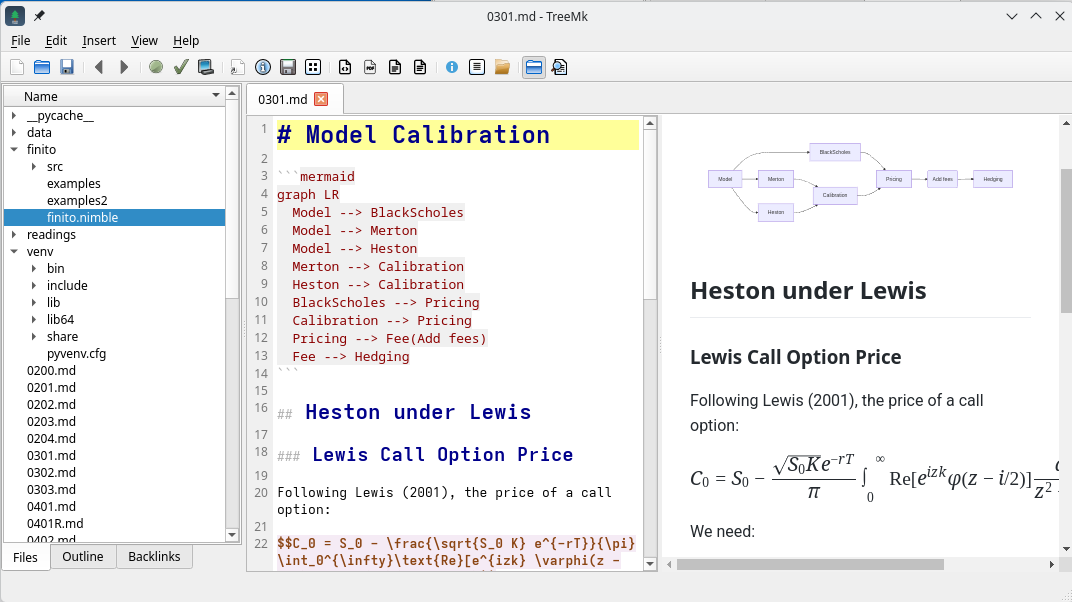
TreeMk is an integrated Markdown editor and file explorer that works directly with your file system. No proprietary vaults, no import/export hassles—just your files, organized your way, right where they already are.
Why TreeMk?
Your notes and documents are valuable. They shouldn't be locked inside a proprietary vault or database. TreeMk respects this by working directly with standard Markdown files in your file system. You maintain full control—edit with other tools, sync with any service, backup however you prefer.
TreeMk simply provides the tools to make working with these files more pleasant: wiki-style linking, live preview, full-text search, and intelligent organization—all without moving your files anywhere.
Download
You can download TreeMk for your platform from:
https://github.com/jailop/treemk/releases
Installers and portable versions are available for Windows, MacOS, and Linux:
- Windows x64_86 Installer
- Windows x64_86 Portable
- MacOS arm64
- Linux x86_64 AppImage
- Linux x86_64 Deb
MacOS users, take care to bypass the OS security gatekeeper for this app. Otherwise, it will be reported as damaged and won't run.
Archlinux users:
Documentation
Getting Started
- Getting Started - Learn the basics and create your first notes
- Installation - Download and install guide (web only)
User Guide
- Editor Features - Discover powerful editing capabilities
- Navigation - Master wiki-links and note organization
- Preview Features - Formulas, diagrams, and rendering options
- Math Formulas - LaTeX mathematical notation
- Code Blocks - Syntax highlighting for code
- Mermaid Diagrams - Creating flowcharts and diagrams
- AI Assistant - AI-powered writing help
- Themes and Appearance - Customize TreeMk's look
- Exporting Your Notes - Share as HTML, PDF, or DOCX
Workflows
- Real-World Use Cases - Research, documentation, journaling, and Zettelkasten
Reference
- Keyboard Shortcuts - Complete reference of shortcuts
- Settings Reference - Every configuration option explained
- FAQ - Frequently asked questions
- Contributing - Help improve TreeMk (web only)
- License - License information (web only)
What You Get
🗂️ File System Integration
TreeMk provides an integrated file explorer alongside your editor. Navigate your folders, create new files, rename or delete—all while keeping your existing file organization. No import needed, no export required.
🔗 Wiki-Style Linking
Connect related notes using simple [[note-name]] syntax. TreeMk creates clickable links between documents and shows you backlinks—which other notes reference the current one. Your knowledge base grows organically without forced hierarchies.
📝 Focused Editor
A clean editing environment with line numbers, syntax highlighting, auto-completion, and smart formatting. Word prediction learns from your content. The AI assistant (via Ollama or OpenAI) helps when you need it.
📊 Rich Content Rendering
- LaTeX math formulas for equations and scientific notation
- Syntax-highlighted code blocks for technical documentation
- Mermaid diagrams for flowcharts and visualizations
- Live preview that updates as you type
🔍 Smart Navigation
Full-text search across all files, document outline for quick heading navigation, backlinks panel to discover connections, navigation history with back/forward buttons and history panel, and quick-open dialog. Find what you need, when you need it.
Getting Help
- Use the search box above to find topics
- Browse the guides in the navigation panel
- Press F1 for keyboard shortcuts reference
- Visit the GitHub repository for support
Philosophy
TreeMk is built on a simple principle: your files should remain yours, accessible with any tool, stored wherever you choose. We provide the convenience of an integrated workspace without the lock-in of proprietary formats or databases.
License: GPL-3.0
Website: https://github.com/jailop/treemk